Meeting Recording Policy Template for HR and Legal Teams
Use this meeting recording policy template to set consent rules, retention limits, and access controls. Copy the sample language and adapt it for your team.

Every team that records Google Meet, Zoom, or Teams calls needs a written meeting recording policy before the first file lands in a shared folder. Without one, consent is inconsistent, retention becomes “forever by default,” and HR ends up answering the same questions after every complaint.
A good policy fits on one or two pages. It tells employees when recording is allowed, how to notify participants, where files live, and when they get deleted. This guide gives you that structure plus copy-paste language you can hand to legal, HR, or IT today.
For day-to-day norms around announcing recordings and sharing recaps, start with our meeting recording etiquette guide for remote teams. If you operate in the EU or handle health data, pair this template with our GDPR meeting recording guide and HIPAA-compliant meeting recording guide.
Key takeaways
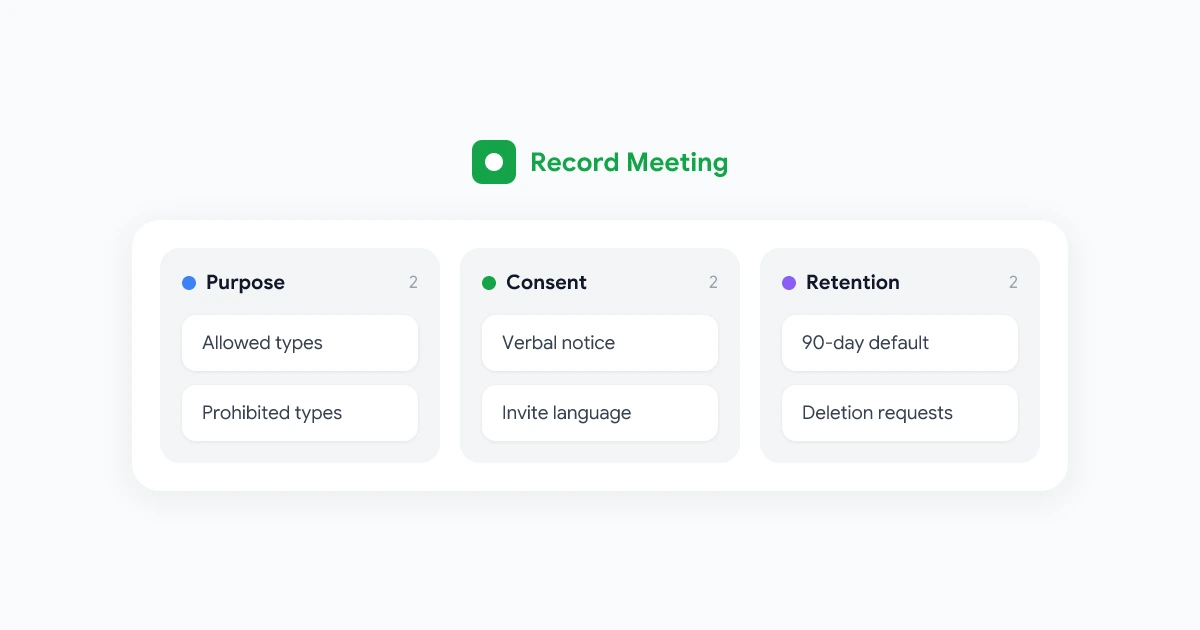
- Purpose: State why you record and which meeting types are in scope.
- Consent: Require a verbal notice every time, plus calendar invite language.
- Access: Limit who can open files to people who were on the call or have a documented need.
- Retention: Set a default deletion window (90 days is a common starting point).
- Escalation: Name who approves exceptions and who handles deletion requests.
Why a meeting recording policy matters
Recording feels like a personal productivity choice until something goes wrong. A manager shares a 1-on-1 without asking. A sales call gets stored in a personal Drive folder with “anyone with the link” turned on. A candidate interview is kept for two years with no documented reason.
A written policy does three jobs at once:
- It sets expectations before conflict. People know recordings exist, why they exist, and how to opt out.
- It gives HR and legal a single source of truth. Investigators, regulators, and employees all read the same rules.
- It connects policy to tools. The policy should name approved recorders, storage locations, and who configures access.
According to SHRM’s 2024 workplace technology survey, more than half of employers now use video conferencing daily. Recording adoption followed the same curve. Policies written in 2020 often still assume “only the host can record natively.” Browser-based recorders, AI transcripts, and async recaps changed that picture. Your policy needs to cover the stack you actually use, not the stack you had when remote work started.
What every meeting recording policy should include
Think of the document as six blocks. Legal can expand any section, but these headings should all appear.
1. Scope and purpose
Define which meetings the policy covers and why you record at all. Typical allowed purposes:
- Accurate notes and action items after project or client calls
- Training and onboarding for sessions meant to be replayed
- Quality review for customer support or sales coaching (with extra rules)
- Regulatory or contractual record-keeping where law or contract requires it
Also list what the policy does not cover. Many teams prohibit recording for performance discipline, termination conversations, or medical discussions unless a separate compliance program applies.
2. Consent and notice
Two-party and all-party consent laws vary by US state and by country. Your policy cannot replace legal advice, but it can require behavior that keeps you on safer ground everywhere:
- Verbal announcement at the start of every recorded call
- Calendar invite language so external guests see the notice before they join
- Immediate stop if any participant asks to turn recording off
- No covert recording, including “silent” capture without a visible indicator
Link to your Google Meet recordings security guide for technical controls that support the notice requirement.
3. Approved tools and storage
Name the recorders employees may use. If IT has not approved a tool, the policy should say “do not use it for work calls.”
For each approved tool, specify:
- Where files are saved (Shared Drive, team workspace, not personal accounts)
- Who owns the recording (usually the meeting host or their manager)
- Default sharing settings (participants only, no public links)
4. Access and sharing
Default to narrow sharing. The four people on the call see the file. Anyone else needs a named reason and an owner who adds them.
Add explicit prohibitions:
- Forwarding download links in public Slack channels
- Uploading work recordings to personal cloud accounts
- Using clips in marketing or social posts without written approval from everyone visible or audible
5. Retention and deletion
Pick a default retention period and stick to it. Common defaults:
| Meeting type | Suggested retention | Notes |
|---|---|---|
| Internal standups and project syncs | 90 days | Enough for async catch-up, low long-term value |
| Client or vendor calls | 1 year or contract term | Match customer agreements |
| Interviews and hiring panels | 30 to 90 days | Minimize bias and privacy risk |
| Regulated or legal hold | As required by counsel | Pause auto-delete when hold applies |
Document how someone requests early deletion. HR should not need a ticket to IT for a straightforward “please delete my 1-on-1 from Tuesday.”
6. Roles and enforcement
Name owners:
- Policy owner (usually HR or People Ops)
- Technical administrator (IT or security)
- Exception approver (legal or a designated executive)
State consequences for deliberate violations. Most teams treat unauthorized sharing as a conduct issue, not a technology bug.
Meeting recording policy template (copy and adapt)
Replace bracketed text with your company details. Have counsel review before you publish internally.
MEETING RECORDING POLICY
[Company Name] | Effective [Date] | Owner: [HR / Legal contact]

1. PURPOSE
[Company Name] may record video or audio meetings to create accurate notes,
support training, and meet contractual or legal obligations. This policy
applies to all employees, contractors, and guests on calls hosted by
[Company Name] when recording is enabled.

2. WHEN RECORDING IS ALLOWED
Recording is permitted for:
- Internal project and team meetings where all participants are notified
- Client and vendor meetings when disclosed in the invite and at call start
- Training sessions announced as recorded in advance

Recording is prohibited for:
- Termination, discipline, or performance conversations unless Legal approves
- Meetings where any participant declines recording after notice
- Any meeting using a non-approved recording tool

3. NOTICE AND CONSENT
Before recording starts, the host must:
- State that the meeting is being recorded and the purpose
- Confirm no participant objects; if anyone objects, recording stops

Calendar invites for recorded meetings must include:
"This meeting may be recorded for [notes / training / quality review].
Contact [host email] before the call if you prefer not to be recorded."

4. APPROVED TOOLS AND STORAGE
Approved recorders: [List tools, e.g., Google Meet native recording,
Record Meeting extension, approved Zoom cloud recording]

Recordings must be stored in [Shared Drive / team workspace name].
Personal cloud accounts and "anyone with the link" sharing are not allowed.

5. ACCESS
Access is limited to meeting participants and others with a documented
business need approved by the recording owner. Managers may not access
recordings of meetings they did not attend without HR or Legal approval.

6. RETENTION
Default retention: [90] days from the meeting date, then automatic deletion
unless tagged for legal hold or a longer period approved in writing.

Retention overrides require approval from [Legal / HR email].

7. DELETION AND REQUESTS
Any participant may request deletion of a recording that features them.
Submit requests to [privacy@company.com]. We will respond within [15]
business days.

8. SECURITY INCIDENTS
Report unauthorized access or sharing to [security@company.com] immediately.

9. TRAINING
All employees who host recorded meetings must complete [training name]
before their first recorded call.

10. REVIEW
This policy is reviewed [annually / semi-annually]. Questions: [HR contact].
Note: This template is general information, not legal advice. Laws differ by state and country. Have qualified counsel review your final policy.
How HR and legal should roll out the policy
A policy in a PDF nobody reads is worse than no policy. Rollout in four steps.
Step 1: Align stakeholders in one working session
Invite HR, legal, IT, and one line manager who records often. Decide:
- Default retention window
- Approved tool list
- Which meeting types are off limits
- Who handles deletion requests
If you operate in the EU, confirm how your lawful basis for recording (consent vs. legitimate interest) appears in the employee privacy notice. Our GDPR meeting recording guide walks through that choice in plain language.
Step 2: Publish where people already look
Post the policy in:
- Employee handbook or intranet HR section
- IT acceptable-use policy (cross-link both ways)
- Onboarding checklist for new hires
- Manager toolkit for running remote meetings
Add a three-line summary to the company wiki. Link the full PDF for auditors.
Step 3: Train hosts, not everyone at once
Start with roles that record weekly: sales, customer success, recruiting, team leads. Training should take 15 minutes and cover:
- The verbal script for announcing recording
- Where to save files
- How to pause or stop when someone asks
- How to request deletion
Step 4: Audit quarterly
IT or security should pull a sample of recordings each quarter and check:
- Are files in approved storage?
- Does sharing match attendance?
- Are files past retention still present?
- Are prohibited meeting types showing up in search?
Fix gaps with coaching first. Repeat violations go to HR under your conduct policy.
Special cases HR sees most often
Job interviews
Recruiting teams often want recordings for panel debriefs. That can work if candidates know before the call and retention is short. Many companies use 30 days and restrict access to the hiring panel only. See your local employment and privacy rules before recording candidates in two-party consent states.
Customer and vendor calls
External guests have not signed your employee handbook. Notice in the invite plus a verbal check at start is the minimum. Some enterprise customers will ask for your policy during security review. Keep a customer-facing one-pager derived from sections 2, 4, and 5 of the template above.
All-hands and large webinars
Opt-out gets harder at scale. For internal all-hands, announce recording and tell people how to ask questions off the record (chat to HR, stay after with camera off). For public webinars, treat the session as recorded by default and say so on the registration page.
Cross-border teams
A policy written for California may not satisfy Germany or Brazil. If you have employees or customers in multiple regions, legal should add a jurisdiction appendix or separate regional addenda. The core template still works as the global baseline.
Connecting policy to your recording stack
Policy only works when the default tool path matches the rules. If the policy says “store in the Team Projects Shared Drive” but your recorder saves to the host’s My Drive, people will follow the tool, not the PDF.
When you evaluate or standardize on a recorder, check:
- Storage location: Can you force team workspace or Shared Drive saves?
- Access controls: Can you restrict sharing to participants?
- Retention: Can admins set auto-delete or export for legal hold?
- Notice: Does the product show a visible recording indicator to all participants?
Record Meeting records from the participant’s browser with transcripts and summaries stored in your workspace. Pair it with the access and retention rules above so IT knows where files land. For security architecture details, see the Record Meeting security page.
Checklist before you publish internally
Use this list in your working session:
- Scope: Allowed and prohibited meeting types are listed
- Notice: Verbal script and calendar invite text are approved
- Tools: Only approved recorders appear in the policy
- Storage: Default folder or workspace is named
- Access: Participant-only sharing is the default rule
- Retention: Default window and exception process are defined
- Deletion: Request channel and response timeline are published
- Training: Host training exists and is assigned
- Review: Annual review date and policy owner are named
- Legal review: Counsel has signed off for your jurisdictions
Put the policy to work this week
You do not need a 40-page handbook. You need a clear meeting recording policy, approved tools, and hosts who announce recording the same way every time.
Copy the template above, run it through legal, publish it where managers already look, and train the teams that record most often. Then schedule a quarterly access check so retention rules actually delete files instead of filling drives.
When your policy and tools align, recordings stop feeling like surveillance and start working as the shared memory they are meant to be. Install Record Meeting when you are ready to standardize capture on Google Meet with transcripts, summaries, and workspace storage your IT team can govern.