Meeting Recording Retention Policy: A Guide for Enterprise Teams
Build a meeting recording retention policy with clear deletion windows, legal hold rules, and audit steps. Enterprise-ready schedules for Google Meet and remote teams.

Most enterprises record more calls than they can safely store. Project syncs, client reviews, and hiring panels pile up in Shared Drives with no end date. A written meeting recording retention policy fixes that gap. It tells every team how long a file stays available, who can extend the window, and what happens when legal or privacy teams ask for deletion.
This guide is for IT, security, HR, and legal owners who need retention rules that work at scale. You will get retention windows by meeting type, a policy outline you can paste into your handbook, and an operational checklist to make auto-delete real instead of theoretical.
For the full consent and access framework, start with our meeting recording policy template. If you operate in the EU or handle health data, pair retention schedules with our GDPR meeting recording guide and HIPAA-compliant meeting recording guide.
Key takeaways
- Default windows: Set a company-wide baseline (90 days is common) and shorter windows for high-risk meeting types.
- Purpose-linked retention: Keep a file only as long as the stated business reason still applies.
- Legal hold: Pause auto-delete with a documented ticket, not a verbal request.
- Automation: Tag recordings at creation so deletion jobs can run without manual sweeps.
- Proof: Log who accessed files and when they were destroyed for audit readiness.
Why meeting recording retention matters at enterprise scale
Recording solved one problem and created another. Teams finally have accurate notes, coaching clips, and async recaps. Storage grew quietly because nobody owned the delete step.
Without a meeting recording retention policy, three risks compound:
- Privacy exposure. Old recordings still hold names, opinions, and screen shares long after the project ended. Data subject requests become expensive when files are scattered across personal drives.
- Legal discovery cost. Litigation and regulatory inquiries can sweep every file you ever kept. Retaining everything “just in case” increases review volume without improving outcomes.
- Operational drag. Shared Drives fill up. Search gets noisy. Security teams cannot tell which files still matter.
GDPR’s storage limitation principle and HIPAA’s minimum necessary standard both push toward defined lifetimes, not infinite archives. Even US teams without a single privacy law benefit when retention is written down and enforced. Our guide to sharing meeting recordings securely pairs access controls with deletion so files do not linger in shared folders after access is revoked.
How long should you keep meeting recordings?
There is no universal number. Retention should match meeting type, regulatory context, and contractual promises to customers.
Suggested retention windows by meeting type
| Meeting type | Suggested retention | Rationale |
|---|---|---|
| Internal standups and project syncs | 30 to 90 days | Enough for async catch-up, low long-term value |
| Client and vendor calls | Contract term or 1 year | Align with customer agreements and dispute windows |
| Sales demos and discovery | 90 to 180 days | Coaching and pipeline review, then delete |
| Hiring interviews | 30 to 90 days | Minimize bias risk and candidate privacy exposure |
| Board, exec, or legal discussions | Per counsel instruction | Often longer, sometimes permanent with strict access |
| Training and enablement | 6 to 12 months | Replay value until content is refreshed |
| Regulated or clinical sessions | Per sector rule | HIPAA, financial services, or public sector schedules apply |
Document the business purpose next to each window. “We keep client calls for one year to resolve billing disputes” survives an audit better than “we keep them because sales wants to.”
When shorter is safer
Shorten retention when recordings capture:
- Performance feedback or compensation talk
- Health, family, or other sensitive personal details
- Unreleased product or M&A information
- Candidate assessments where local law limits how long you may keep assessments
If your company already prohibits recording certain meeting types, retention rules should say those files must be deleted immediately if created by mistake.
What a meeting recording retention policy should include
Treat retention as its own section inside your broader recording policy, or publish a standalone addendum that legal can reference quickly. Either way, these blocks should appear.
1. Scope
State which recordings the retention rules cover: native Google Meet files, browser-based captures, Zoom cloud recordings, AI transcripts, and summaries derived from audio. If a tool is not approved, say retained files from that tool are out of compliance regardless of age.
2. Default retention period
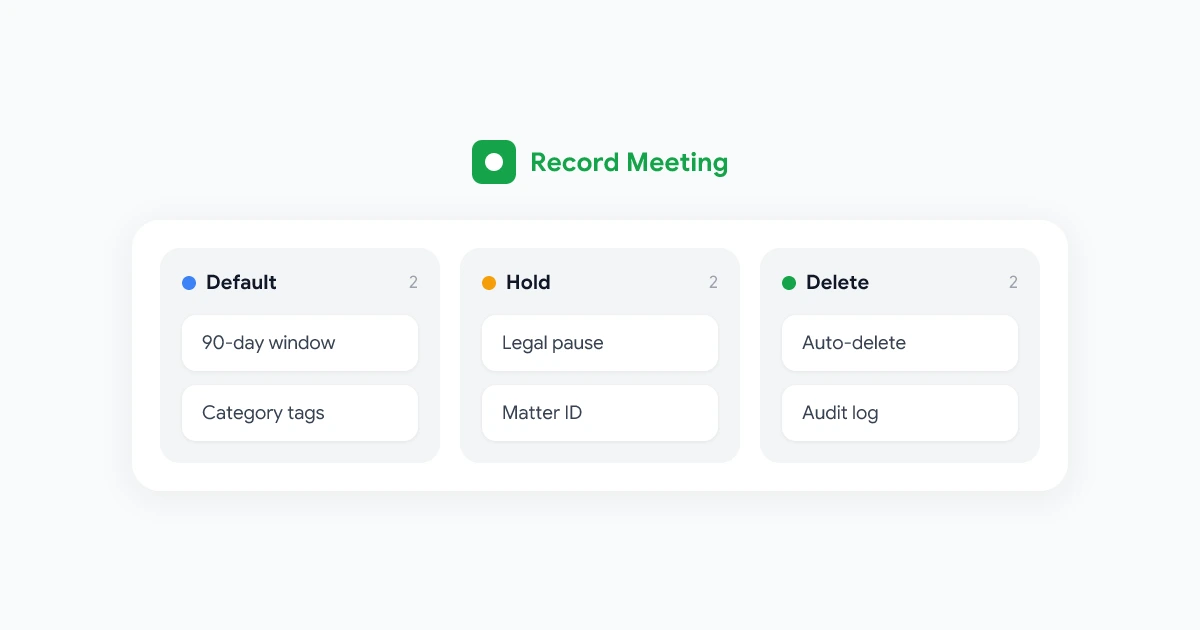
Name one default for the whole company, for example 90 days from the meeting date. Every file inherits that window unless tagged into an approved exception category at creation.
3. Category overrides
List longer or shorter windows by meeting type using the table above. Require hosts or workspace admins to select a category when saving a file. “General meeting” should be the default, not “client call.”
4. Extension and exception process
Define who may extend retention beyond the default:
- Manager extension: Up to 30 additional days for active deals or open investigations, with a written reason in the ticket system
- Legal hold: Indefinite pause on deletion when counsel opens a matter
- Regulatory hold: Same as legal hold, tagged with the regulation or contract that requires longer storage
Verbal approvals should not count. Extensions need a name, date, and reason stored where IT can query them.
5. Deletion method
Specify how files are destroyed:
- Permanent delete from primary storage and trash
- Removal from backup cycles according to your backup retention schedule
- Revocation of shared links and transcript copies in email or chat
State that “move to archive folder” is not deletion unless archive has the same access controls and a fixed destruction date.
6. Data subject and employee requests
Give a single intake channel (privacy@ or HR case system) for early deletion requests. Set a response timeline, often 15 to 30 business days. Link to your GDPR or state privacy process if applicable.
7. Roles and accountability
| Role | Responsibility |
|---|---|
| Policy owner (HR or Legal) | Approves retention windows and exception rules |
| IT / Security | Configures auto-delete, legal hold tags, and audit logs |
| Meeting hosts | Select correct category and request extensions before expiry |
| Internal audit | Samples compliance quarterly |
8. Review cycle
Review retention windows at least annually and after major regulatory change. Note the review date in the document footer.
Sample meeting recording retention policy language
Adapt this block into your employee handbook or IT policy wiki. Have counsel review before publication.
MEETING RECORDING RETENTION POLICY
[Company Name] | Effective [Date] | Owner: [Legal / HR contact]

1. PURPOSE
This policy defines how long [Company Name] retains video, audio, and transcript
files from recorded meetings and when those files must be deleted.

2. DEFAULT RETENTION
Unless tagged into an approved exception category, all meeting recordings and
derived transcripts are deleted [90] days after the meeting date.

3. CATEGORY RETENTION
- Internal team meetings: [90] days
- Client and vendor calls: [365] days or contract term, whichever is shorter
- Sales calls: [180] days
- Job interviews: [60] days after hiring decision
- Training sessions: [12] months
- Legal, board, or compliance meetings: as directed by Legal

4. EXTENSIONS
Hosts may request a one-time extension of up to [30] days by submitting a ticket
to [IT / Legal portal] before the deletion date. Extensions require a business
justification and approver name.

5. LEGAL AND REGULATORY HOLD
When Legal or Compliance issues a hold, affected recordings are excluded from
auto-delete until Legal releases the hold in writing. Holds reference a matter ID.

6. DELETION PROCESS
IT runs automated deletion on approved storage locations weekly. Deleted files
are removed from active storage and trash according to the backup schedule.
Personal cloud accounts and unapproved tools are not in scope and must not be
used for work recordings.

7. EARLY DELETION REQUESTS
Any participant may request deletion of a recording that features them by
contacting [privacy@company.com]. We respond within [15] business days unless
law or an active hold prevents deletion.

8. AUDIT
Security or Internal Audit reviews a sample of recordings each quarter to confirm
category tags, sharing settings, and deletion dates match this policy.

9. QUESTIONS
Contact [policy owner email]. This policy is reviewed [annually].
Note: This sample is general information, not legal advice. Retention obligations vary by industry, state, and country.
Legal hold and retention: how they interact
Legal hold overrides your normal schedule. When hold is active, auto-delete must stop for every file tied to the matter, including transcripts and AI summaries stored separately from the video.
Run holds through a formal process:
- Counsel opens a matter with a unique ID and date range or participant list.
- IT applies a hold tag in storage or the recording platform so deletion jobs skip those objects.
- Employees are told not to delete local copies or chat links related to the matter.
- Counsel releases the hold in writing when the matter closes, and IT schedules destruction per the original or extended retention rule.
Avoid informal holds in email threads. Auditors ask for a list of holds applied during a period. A ticketing system or GRC tool beats a spreadsheet maintained by one lawyer.
For EU teams, remember that GDPR erasure requests may still apply during a hold, but legal grounds to refuse erasure can exist when retention is necessary for legal claims. Document that analysis. Our GDPR meeting recording guide covers storage limitation and erasure in more detail.
Making retention work in your recording stack
Policy without tooling becomes shelfware. Enterprise teams should connect retention rules to where files are created.
Tag at creation
When a host starts recording, prompt for category: internal, client, interview, training, other. Metadata drives deletion jobs. Guessing at delete time fails because nobody remembers what the call was about three months later.
Centralize storage
Files in personal My Drive folders resist company-wide lifecycle rules. Standardize on Shared Drives or a team workspace where admins can enforce retention labels. See where Google Meet recordings are saved for how native Meet storage behaves and why migration to Shared Drives matters.
Automate deletion
Use Google Workspace retention rules, vendor auto-delete settings, or scheduled scripts that query file age and category. Manual quarterly sweeps do not scale past a few hundred employees.
Log access and destruction
Keep an audit trail: file ID, meeting date, category, deletion date, and hold IDs applied. You do not need to log every view for every internal sync, but regulated industries often require access logs for client and clinical recordings.
 Try Record Meeting
Record Google Meet from the browser with transcripts and summaries stored in your workspace. Pair workspace storage with your retention labels so IT can govern lifecycle from one place.
Get Started Free
Enterprise rollout in four steps
Step 1: Inventory what you store today
Before you set new windows, find out where recordings actually live. Search Shared Drives, personal drives, Zoom clouds, and vendor SaaS archives. Count files older than one year. That number builds executive support for retention.
Step 2: Align legal, HR, and IT on windows
Use the category table in this guide as a starting draft. Legal confirms hold and regulatory categories. HR confirms interview and performance rules. IT confirms which storage locations can run automated deletion.
Step 3: Publish and train hosts
Publish the retention section inside your meeting recording policy template or as a linked addendum. Train hosts who record weekly: pick the right category, request extensions before expiry, and never move files to personal storage to “keep them longer.”
Step 4: Audit quarterly
Each quarter, sample 50 to 100 recordings and check:
- Category tag matches meeting type
- Age aligns with policy or an active hold
- Sharing still matches attendance
- Deletion job removed files past their window
Fix gaps with coaching first. Repeat intentional circumvention goes to HR.
Special retention considerations
Cross-border teams
A 90-day default in the US may be too long for some EU employee meetings or too short for contractual customer archives in another region. Legal may publish regional addenda while keeping one global baseline.
AI transcripts and summaries
Retention applies to derived text, not just video. If you delete a recording but keep the transcript in email, you have not met your policy. Include transcripts, summaries, and exported clips in the same lifecycle.
Mergers and acquisitions
During integration, hold overlapping policies until counsel merges retention schedules. Do not run bulk delete jobs until you know which matters require preservation.
Healthcare and financial services
Regulated teams often need longer retention for specific encounter types and shorter retention for anything that accidentally captured PHI or MNPI outside approved workflows. Use the sector guides linked above rather than the generic table alone.
Frequently asked questions
Put retention on the calendar this quarter
A meeting recording retention policy turns storage from an accident into a decision. Pick a default window, map categories to business purposes, wire auto-delete to approved storage, and document how legal hold pauses the clock.
Copy the sample language above, run it through counsel, and add retention to your next host training session. Schedule a quarterly sample audit so files actually disappear when the policy says they should.
When retention, access, and recording tools align, you keep the benefits of captured meetings without building an archive nobody can defend. Install Record Meeting to standardize Google Meet capture with transcripts and workspace storage your IT team can govern alongside the rules in this guide.