How to write meeting minutes, in one sentence: record what the group decided and who will do what, not everything that was said. A complete set has the meeting details, who attended, one short entry per agenda item, any motions and votes in their exact words, the action items with an owner and a due date, and the time the meeting ended.
This guide covers the format, a template you can copy, a filled-in example and the steps to follow. It also shows how to draft minutes from a recording, so you can take part in the meeting instead of typing through it.
What are meeting minutes? A record of decisions, not discussion
Meeting minutes are the official written record of a meeting. Michigan State University’s guide to writing minutes describes them as documenting the decisions a body made: the date, time, location and attendees, plus the motions presented and their results. The official Robert’s Rules of Order FAQ puts it in one line: minutes are a record of what was done at a meeting, not a record of what was said.
That is what separates minutes from the other records a meeting can leave behind.
| Meeting minutes | Meeting notes | Transcript | |
|---|---|---|---|
| Purpose | The official record of decisions | A working recap for the team | A word-for-word account |
| What it contains | Attendance, motions, decisions, votes, action items | Key points, context, decisions, next steps | Everything said, by speaker |
| Who approves it | The group, usually at its next meeting | Nobody | Nobody |
| Use it for | Boards, committees and councils | Team syncs, client calls, project check-ins | Checking exactly what someone said |
Not every meeting needs minutes. For a weekly team sync or a client call, a short recap is usually enough, and our meeting recap email template covers that format. Write minutes when a group makes decisions it may have to prove later.
Are meeting minutes a legal requirement?
It depends on who is meeting and where. Three examples from primary sources:
- US corporations. Delaware’s General Corporation Law, section 142, gives one of a corporation’s officers the duty to record the proceedings of the meetings of the stockholders and directors in a book kept for that purpose.
- UK companies. Section 248 of the Companies Act 2006 says every company must record minutes of all proceedings at meetings of its directors and keep them for at least ten years. If it fails to, every officer in default commits an offence.
- US nonprofits. The IRS instructions for Form 990 ask, on lines 8a and 8b, whether the organization contemporaneously documented every meeting of its governing body and of the committees that can act for it. Approved minutes are one form of documentation the IRS names.
None of these rules covers an ordinary team meeting, where minutes are a choice. This is general information, not legal advice, so check your bylaws and the law that applies to your organization.
What to include in meeting minutes: the standard format
The meeting minutes format barely changes from one organization to the next. A formal body adds motions and votes. A team can drop them.
| Section | What to write | Formal meetings | Team meetings |
|---|---|---|---|
| Heading | Name of the group, kind of meeting, date, time and place or call link | Yes | Yes |
| Attendance | Who chaired, who took the minutes, who was present and who was absent | Yes, plus whether there was a quorum | Yes |
| Previous minutes | Whether the last minutes were approved, and whether they were corrected | Yes | Optional |
| Agenda items | One short entry per item: what was decided or reported | Yes | Yes |
| Motions and votes | The exact wording of each motion, who made it and the result | Yes | Rarely |
| Action items | The task, its owner and the due date | Yes | Yes |
| Close | The date of the next meeting and the time this one ended | Yes | Optional |
| Approval | The date the minutes were approved and who signed them | Yes | No |
The formal column is built on the essential elements in the MSU guide, which is based on the 12th edition of Robert’s Rules of Order Newly Revised. Two of its details are easy to miss: naming the seconder of a motion is optional, and voting results are recorded without names unless names are called for.
What to leave out of meeting minutes
The same guide lists what minutes should not include:
- Detailed discussions or personal opinions. Record the outcome, not the argument that led to it.
- Withdrawn motions. A motion that was withdrawn stays out of the record.
- Full reports. Attach the treasurer’s report or the slide deck instead of summarizing it.
It also says the minutes should not reflect the secretary’s personal opinion, so leave out words such as “heated” or “excellent”. The Robert’s Rules FAQ goes further and calls it improper to summarize the matters discussed. It adds that these are default rules, which apply only where the law, your bylaws or your own special rules say nothing different. A team with no rulebook can add a line of context per item.
How to write meeting minutes step by step
Good minutes are mostly prepared before the meeting and finished the same day.
Before the meeting
- Turn the agenda into your outline. Copy each agenda item into the template below as a numbered entry. During the meeting you only fill in the blanks.
- Fill in the heading early. Add the date, time, place and the names from the invite, so taking attendance means ticking names off.
- Agree on the level of detail. Ask the chair whether the group needs formal minutes with motions and votes, or a shorter list of decisions and actions.
- Decide whether to record. A recording lets you check the wording later. The MSU guide recommends obtaining consent from attendees and telling them what the recording is for. If your organization records often, put the rule in a written meeting recording policy.
During the meeting
- Note the start time and who is present. In a formal meeting, also note whether there is a quorum.
- Write decisions, not dialogue. For each agenda item, wait for the outcome and write that down in one or two sentences.
- Take motions down word for word. The MSU guide says to include the exact wording of each motion and to avoid paraphrasing it. If you missed the wording, ask the chair to repeat it before the vote.
- Give every action item an owner and a date. “Marketing to follow up” is not an action item. “Sam sends the revised quote by Friday” is. See how to track action items from a meeting so none get lost.
- Read the decisions back before the meeting ends. It saves a round of corrections later.
After the meeting
- Write the draft the same day. Use full sentences, the past tense and neutral language. Write “The board approved the budget”, not “We had a great discussion about the budget”.
- Check the draft against your recording or transcript. Confirm names, numbers, dates and the wording of every motion.
- Send the draft out and have it approved. Formal bodies usually approve minutes at their next meeting. According to the Robert’s Rules FAQ, corrections made at that point go into the text of the minutes being approved, and the new minutes only say that the earlier ones were approved “as corrected”. Changing minutes after approval takes a formal motion.
- File the approved minutes where people can find them. One shared folder beats a chain of email attachments. See our guide on how to share meeting notes with your team.
Meeting minutes template you can copy
Paste this meeting minutes template into a document and delete the lines you do not need.
[ORGANIZATION OR TEAM NAME]
Minutes of the [regular / special / board / team] meeting

Date:          [date]
Time:          [start time] to [end time]
Place:         [room or video call]
Chair:         [name]
Minutes by:    [name]

Present:       [names]
Absent:        [names]
Quorum:        [yes or no, formal meetings only]

1. Approval of previous minutes
   [Approved as read, or approved as corrected]

2. [Agenda item]
   Decision:   [what was decided or reported]
   Motion:     [exact wording, who moved it, result of the vote]
   Action:     [task, owner, due date]

3. [Agenda item]
   Decision:
   Action:

Action items
   [Task] | [Owner] | [Due date]

Next meeting:  [date, time, place]
Adjourned at:  [time]

Approved on:   [date]
Signed:        [chair or secretary]
Ready-made templates in Word and Google Docs
- Microsoft Word. Microsoft’s gallery of meeting minutes templates includes simple, classic, team and board layouts. They open in Word for the web and can be exported as a PDF.
- Google Docs. In a document, type @, choose Meeting notes, then pick an event from your calendar. Google’s help page on adding meeting notes to Calendar events says the notes are pre-populated with the event details. If you are the meeting organizer, a prompt offers to share the document and attach it to the event.
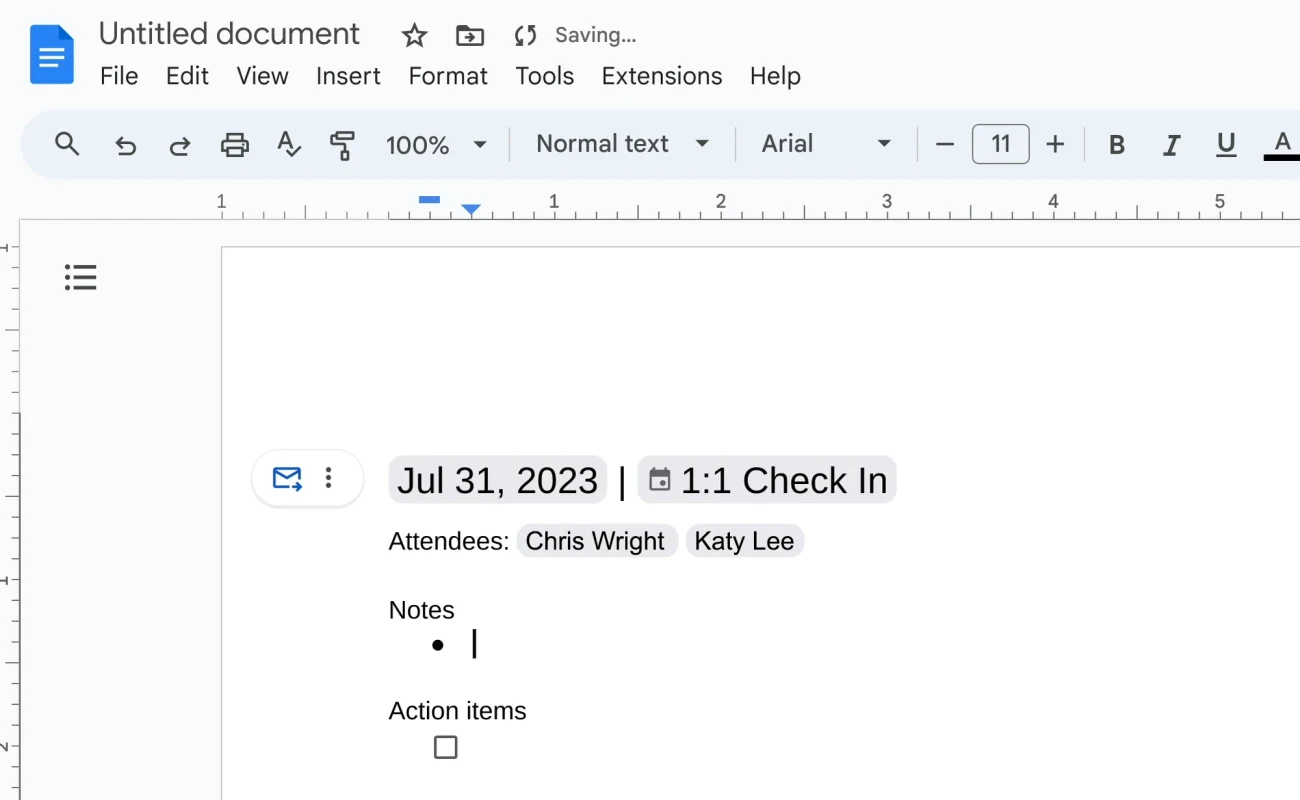
The Google template is built for notes. Google’s own walkthrough of the template describes sections for notes and action items, and none for motions, votes or approval. Add those lines from the template above when you need formal minutes.
Meeting minutes example: a filled-in board meeting
Here is a meeting minutes example for a fictional tenants’ association, written from the template.
Riverside Tenants Association: minutes of the monthly board meeting
- Date and time: 12 November 2026, 6:30 pm to 7:25 pm
- Place: video call
- Chair: Dana Whitfield
- Minutes by: Leo Park
- Present: Dana Whitfield, Leo Park, Priya Nair, Tom Alvarez
- Absent: Maria Costa
- Quorum: yes, 4 of 5 board members
- Approval of previous minutes. The minutes of the 8 October 2026 meeting were approved as corrected.
- Treasurer’s report. Priya Nair reported a balance of $4,210. The report is attached.
- Laundry room repairs. Tom Alvarez moved “that the association spend up to $600 to repair the two dryers in the laundry room.” The motion was adopted, 3 in favor and 1 opposed.
- Winter social. The board agreed to hold the winter social on 14 December 2026 in the community room.
| Action item | Owner | Due |
|---|---|---|
| Get two written quotes for the dryer repair | Tom Alvarez | 26 November 2026 |
| Book the community room for 14 December | Priya Nair | 19 November 2026 |
| Send the approved October minutes to all members | Leo Park | 15 November 2026 |
Next meeting: 10 December 2026 at 6:30 pm. Adjourned at: 7:25 pm.
Notice what the example does:
- Each item ends in an outcome: a decision, a report received or a motion with its result.
- The motion is quoted exactly. It names the person who made it and gives the vote count, but not who voted which way.
- The report is attached, not retold.
- Every action has one owner and one date.
- The debate is missing. However long the board talked about the dryers, the record of it is two sentences.
How to take meeting minutes from a recording or with AI
Typing minutes live has a cost: the person writing is only half in the meeting. Recording the meeting and drafting from the transcript fixes that, and it gives you the exact wording of every motion. Here is that workflow with Record Meeting:
- Tell everyone you are recording and why. Do it before you press record.
- Record the call. Record Meeting records from your own browser in Google Meet, Zoom or Microsoft Teams, and no bot joins the call.
- Open the transcript and notes when the meeting ends. On the Pro plan, each recording comes with a full transcript in 50+ languages and AI meeting notes with decisions and action items.
- Switch the notes to the minutes format. The meeting minutes style lays out attendees, agenda items, motions, decisions and follow-ups in the standard order.
- Check the draft against the transcript. Each action item links back to the transcript line where it was decided, so checking a name or a number takes seconds.
- Edit, then send it for approval. Treat the automatic version as a draft. For a board, the secretary still reviews it and the board still approves it.
 Try Record Meeting
Record Meeting records Google Meet, Zoom and Microsoft Teams calls from your browser, with no bot in the call. The free plan includes 5 recordings of up to 1 hour each. Pro adds a transcript in 50+ languages, AI meeting notes and a minutes format you can export as DOCX.
Get Started Free
Built-in AI notes in Google Meet
Google Meet has its own option, called “Take notes for me”. Google’s help page for the feature says it requires an eligible Google Workspace edition or Google AI plan, supports one language per meeting, and saves the notes as a Google Doc in the meeting organizer’s Google Drive. Our guide to the Google Meet AI summary compares it with the alternatives.
Whichever tool writes the first draft, it summarizes the conversation and does not know your bylaws. Formal minutes need the exact motion, the vote and the approval step, so a person has to finish them.
Frequently Asked Questions
Conclusion
Knowing how to write meeting minutes comes down to three habits. Prepare the outline from the agenda, write down outcomes instead of conversation, and get the draft approved while everyone still remembers the meeting. Start from the template above and keep the example beside it.
If you would rather take part in the meeting than type through it, record it. Record Meeting captures the call in your browser with no bot, and Pro adds the transcript and a draft of the minutes to edit.